

Is That Domain Renewal Notice Real?

A letter arrives that looks like a bill. It names your domain, says the registration is about to expire, and asks you to pay to "renew" it before you lose your website and email. Sometimes a notice like that is real. Often it's a sales pitch dressed up as an invoice, and sometimes it's a scam.
You don't have to work out which from the letter itself. One check settles it, and it takes a few minutes. Here's what these notices look like, how real reminders arrive, and what to do with the next one.
What these notices look like
ICANN, the organization that accredits domain registrars and sets the rules they follow, calls them fake renewal notices: misleading letters or emails from someone claiming to be, or to represent, your current registrar (ICANN). It lists three things they're after:
- A fee you don't owe.
- A switch to a different registrar that you never meant to make. ICANN calls this "slamming".
- Your login or your domain's authorization code, which someone can use to take the domain.
ICANN describes slamming as a fraudulent or deceptive letter, fax, phone call or email that claims to come from your registrar and looks like a renewal. If you don't realize it's fraudulent, your registrar may move the domain to another registrar without knowing anything is wrong (ICANN).
The Federal Trade Commission has gone to court over mail like this. Three cases on ftc.gov show the patterns:
- A "renewal" that was really a transfer. In 2003, Network Solutions, then the largest registrar, settled FTC charges that it mailed solicitations that looked like expiration notices from people's current registrars. The FTC said the notices left out the real expiration dates, which in some cases were months or years away, and didn't say that accepting would move the domain to Network Solutions (FTC).
- Invoices from a reseller. The same year, the FTC said Domain Registry of America mailed millions of notices headed "IMPORTANT NOTICE" that looked like renewal notices or invoices from people's current registrars and warned of the "loss of your online identity." People who thought they were renewing were transferring their domains to the registrar the company resold for. Under the settlement, the company is barred from misleading claims and had to pay redress (FTC).
- Bills for nothing. In 2008, the FTC charged Internet Listing Service with sending fake invoices that showed a business's own domain name, or a near miss such as .org for .com, and appeared to come from its registrar. They asked for payment for a yearly "WEBSITE ADDRESS LISTING." The FTC said most people who paid got no domain registration services at all. Court orders ended the case in 2010 (FTC).
Those cases are old. The trick isn't. In May 2026, the FTC warned small businesses about unexpected invoices in the mail for things they never ordered, domain registration among them, some marked "past due." It added that fake invoices sent by email can be phishing, built to get into a business's data and networks (FTC).
One more thing makes these notices convincing: much of what they print is public. ICANN Lookup, ICANN's free public tool, shows a domain's registrar, and its dates can include when the registration expires (ICANN Lookup FAQ). A notice that gets your domain name, or even your renewal date, right has proved nothing.
Here's one a client of mine received by mail in 2025, with their domain blurred:
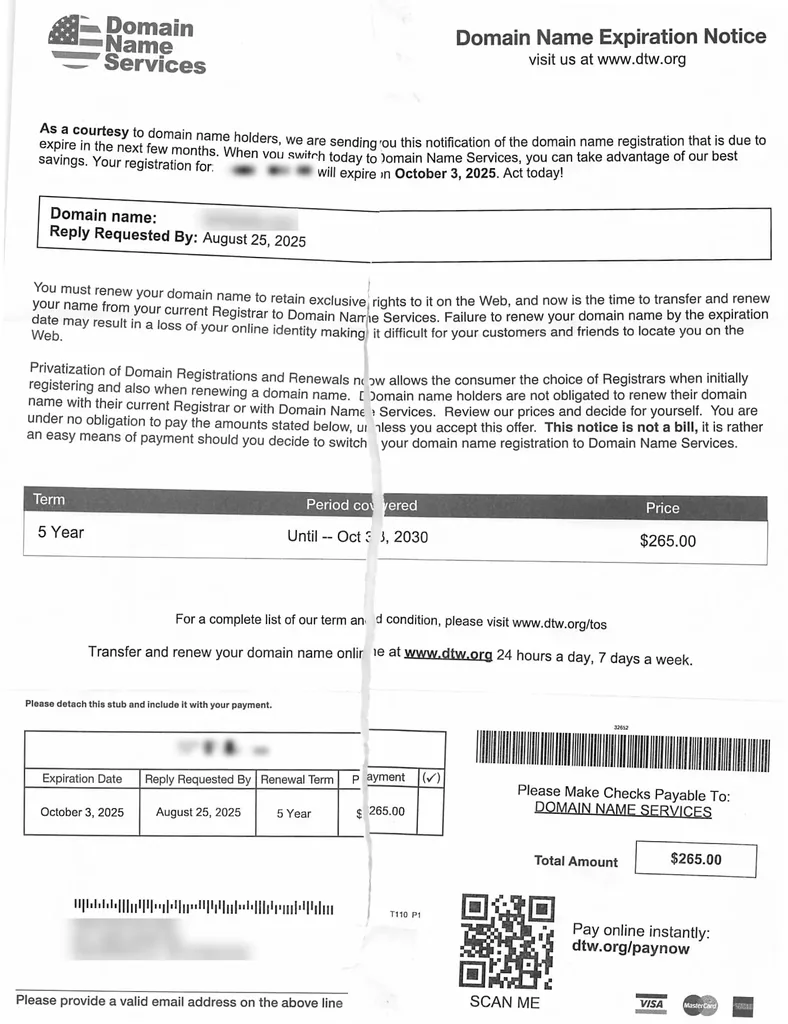
Read it closely and it says what it is. "When you switch today to Domain Name Services," it begins, and the fine print adds "This notice is not a bill." But the layout says otherwise: a bold "Expiration Notice" heading, a reply-by date more than five weeks before the domain actually expired, a price of $265.00 for five years, and a payment stub with a barcode and a "scan me" code. Paying it would have meant moving the domain to a new registrar, not renewing it with the current one.
The warning signs
Put those together and the same signs keep turning up:
- The company named on it isn't your registrar.
- It offers to "renew" but is selling something else: a transfer to another company, or a "listing".
- It gives no exact expiration date, or the real date is months away while the notice says to act now.
- The tone is urgent: "important notice", "past due", warnings that you'll lose your name.
- The domain is slightly off, such as .org when yours is .com.
- It asks for your registrar login or your domain's transfer code.
- It wants you to pay by following its instructions, not inside your registrar account.
No single sign proves a scam, and a polished letter doesn't prove it's real. The check below settles it either way.
How real renewal reminders arrive
ICANN policy requires your registrar to send renewal reminders about a month and about a week before your domain expires, and another within five days after it expires. The registrar has to say on its website how it sends them (ICANN). ICANN's guide to that policy says the notices go to the registrant email address on your domain's registration, so keep that address current (ICANN). If you never got the reminders, ICANN takes complaints through its Domain Renewal Complaint Form.
Real mail on paper is possible too. Under another ICANN policy, your registrar must show you your registration details at least once a year and remind you that false contact information can get the registration cancelled. That notice can come by web, fax, postal mail or email (ICANN).
So a letter isn't proof of a scam, and an email isn't proof it's real. What matters is who sent it. If you registered your domain through a reseller, the reminders may come from the reseller instead of the registrar (ICANN), and ICANN Lookup may show the reseller's name (ICANN Lookup FAQ).
How to check any notice
1. Look up your domain
Go to ICANN Lookup yourself, type your domain and read the results. The "Registrar" field shows who your registrar is (ICANN), and the dates can include when the registration expires.
2. Compare the names
If the company on the notice isn't that registrar, or a reseller you knowingly bought from, the notice isn't a renewal of your domain, whatever it calls itself. It's an offer to move your domain somewhere else, or a bill for something you never ordered.
3. Compare the dates
If the expiration date in Lookup is months away, nothing is urgent, whatever the notice says.
4. Log in to your registrar yourself
Type the registrar's address into your browser, or use a bookmark you made earlier. Don't use a link or phone number from the notice. In your account, find the domain's expiration date and whether it's set to renew automatically. If you're still unsure of the date, ICANN's advice is to contact your registrar (ICANN).
5. Renew there, or not at all
If the renewal is due, pay it in your registrar account. Don't pay the notice.
Never hand over your login or transfer code
To move a domain to a different registrar, you need its authorization code, also called an auth code or transfer code. Your registrar creates it to prevent unauthorized transfers, and may let you generate it yourself in your account (ICANN). That makes your login as valuable as the code.
- Don't give your registrar login or your auth code to anyone who contacted you first, however official they sound.
- Don't approve a transfer you didn't start. ICANN's transfer FAQ says your registrar asks you to confirm a transfer, typically by email to the domain holder. If one of those arrives out of the blue, call your registrar using the number on its own website.
- Turn on two-step sign-in at your registrar if it offers it.
If you already paid
- Call your registrar first, using the number on its website. Ask whether your domain is still registered there and whether a transfer is pending.
- Call your bank or card company about the charge and ask what they can do.
- Report it to the FTC at ReportFraud.ftc.gov, which takes reports of fake invoices (FTC).
- If the misleading notice came from your own registrar, ICANN's list of registrant rights says you shouldn't be subject to false advertising or deceptive practices by your registrar, including deceptive notices and hidden fees (ICANN). Tell the registrar, and the FTC.
Make the real reminders easy to spot
The best defense is knowing your own details well enough that a fake looks wrong at a glance.
- Know who your registrar is, and make sure the domain is registered in your name. Domain, Hosting, Website, Email: What's the Difference? explains why that matters and how to check.
- Keep your contact email current at the registrar, so the real reminders reach you (ICANN).
- Turn on auto-renew, which most registrars offer, and keep the card on file up to date (ICANN).
- Put the expiration date on your calendar.
- Renew for longer if you'd rather see fewer renewals. Registrations typically run one to ten years, and your registrar can tell you whether it renews for more than a year at a time (ICANN).
- Tell whoever opens the mail or pays the bills that domain renewals are paid only inside the registrar account. The FTC's advice to small businesses is to check every invoice closely and make your process for approving them clear (FTC).
If you're still picking a name, How to Choose a Domain Name covers that part.
Where my care plan fits
On my plans, the $79/mo care plan starts the day your site launches and covers hosting on Vercel with SSL, daily backups, uptime monitoring, and security and dependency updates. Renewing your domain isn't on that list, so the renewal date belongs on your own calendar, and the checks above apply whoever builds your site.
If you're planning a new site, see the plans. Starter is $2,400 for 5 pages, Deluxe $4,080 for 7 and Premium $6,720 for 10. Each is one build fee, paid in full for 10% off or half now and half before launch, and hosting comes with the $79/mo care plan from launch day. When you're ready, start your project.
Jamin Giersbach
Jamin Giersbach is one of the three designers who started Popproxx in New York City in 2000. Early clients included WebMD, MSD Capital and Bookmans. In 2007 he took Popproxx to Oregon, and he has run it on his own ever since.
Read the full story →